Showing posts with label Scala. Show all posts

Tuesday, 10 October 2017

Scala tuples

Scala tuple:
Scala tuple is a class and combines a fixed number of items together so that they can be passed around as a whole.

Note:

  • Unlike an array or list, a tuple can hold objects with different types but they are also immutable.
  • A tuple isn't actually a collection; it's a series of classes named Tuple2, Tuple3, etc., through Tuple22.

Example:

Little bag or container you can use to hold things and pass them around.

1)Creating tuples:
Tuples can be created in two ways:
  1. Using the enclosing elements in parentheses.
  2. Creating a tuple with ->
i)Using the enclosing elements in parentheses:
 
Ex:
val tupleex = (1,"Mano")

To get to know the tuple class:
tupleex.getClass()


ii)Creating a tuple with ->:
We can also create tuple with ->, mostly useful at Map collection.


2)Accessing tuple elements:

Accessing tuples in different ways:
  1. Using underscore with position 
  2. Use variable names to access tuple elements 
  3. Iterating over a Scala tuple 
  4. The tuple toString method
i)using underscore with position
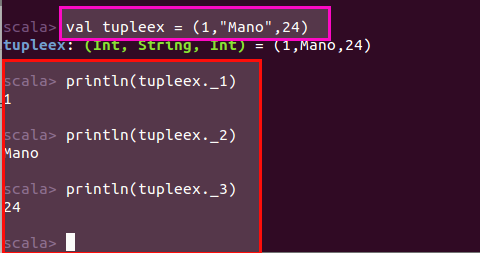
We can access tuple elements using an underscore syntax. The first element is accessed with _1, the second element with _2, and so on.


Ex:

ii)Use variable names to access tuple elements:
When referring to a Scala tuple we can also assign names to the elements in the tuple.

Let's we try to do this when returning miscellaneous elements from a method.

Create method, that returns tuple:

def tuplemeth = (1,"Mano",24)

Create variables to hold tuple elements:
val(id,name,age) = tuplemeth

We can ignore the elements by using an underscore placeholder for the elements you want to ignore.
val(id,name,_) = tuplemeth


iii)Iterating over a Scala tuple
As mentioned, a tuple is not a collection; it doesn't descend from any of the collection traits or classes. However, we can treat it a little bit like a collection by using its productIterator method.


iv)The tuple toString method:
The tuple toString method gives you a good representation of a tuple.


Wednesday, 27 September 2017

9)Tuples in scala

Tuples in scala:
Tuple is the collection class in Scala which can hold multiple values with same or different types together.

Syntax:
tuples are declared within braces "()"

Note:
tuple can hold up-to 22 values/elements, since the scala compiler is smart enough, so dont need to specify the lengh explicitly.
tuple1,tuple2.....tuple22
Useful at below situations:

  • if you want a common reference
    • Ex: student details like name,age, etc.,
  • Performance wise is better than list

Example:
Student details with three elements


Note:
.getClass function is used to return data type of variable
Access values of Tuple in Scala:
To access values inside the tuple is through position of elements _1,_2,......_22.

Syntax:
<<tuple_variable>>._1
<<tuple_variable>>._2
<<tuple_variable>>._3...etc
Example:
val studentname = studentinfo._1


Assign values of tuples to multiple variables in one line:
We can also assign the tuple values to multiple variables at once

Syntax:
val (var1,var2,...) = tupleholder
Example:


8)Pattern Matching in Scala

Pattern Matching in Scala:
Pattern matching is a mechanism for checking a value against a pattern.  and much similar to java switch statement.

Syntax:
A match expression with the match keyword and at least one case clause.
varible_name match
{
case value => rep_value
.....
}

Simple Example:


Note:
Wild card _ - which means it will match anything.

Pattern matching to store the result in varible:

let's we try to hold the return match result into variable.

Example:


Pattern matching with or condtion:
passing or (|) filter in the case conditon

Example:


7)Range in Scala

Range in Scala:
Selective range of many types such as numbers or characters in sequence that can be used in looping constructs.

Types of Ranges:
  1. Number Ranges
  2. Alphabetical Ranges

1.Number Ranges:
Selective range of numbers using to,until, and by kewords.

Example:

i)Selective range using to, until keyword:


Note:

  • to keyword to include the the last upper bound
  • until keyword to exclude the last upper bound
ii)Range numbers 1 to 10 with increment of 3:


Note:
by keyword to increment by the number as opposed to the default value of 1.
2.Alphabetical Ranges:
Selective range of alphabets using to,until, and by kewords.

Example:
i)Selective range using to, until keyword:


Note:
  • to keyword to include the the last upper bound character
  • until keyword to exclude the last upper bound character
ii)Range characters 'A' to 'Z' with specified increment of 3:


Note:
by keyword to increment by the character as opposed to the default value of 1.
iii)Convert Scala Range into collections:
Sometimes we may need to convert the Range into some other data structure such as List, Set, Sequence or an Array.


Below, which uses methods called toList, toArray, toSet and toSeq functions to convert Range

Example:


Note:

  • mkString() function -  create a string representation of each collection type. The .mkString() function takes in a delimiter.
  • toList, toArray, toSet and toSeq - to convert Range


6)Scala programming constructs: for,while and do-while loop

for loop:
Repeatation of execution until the specific cycles.

1)Iterating 1 to 5 number in scala using to keyword:

Example:


Note:
keyword to which meant that iteration number 5 is included.

2)Iterating 1 to 5 number in scala using until keyword:

Example:


Note:

keyword until  which meant that iteration number 5 is not included.

3)if conditions in for loop as well:

if clause to add filtering support as you iterate through your items.

Example:


4)if conditions in for loop and return the result back using the yield keyword:


using the {} in our for loop to make our expressions more explicit.

Example:


5)for loop usage in 2-Dimensional array:

In scala, to work with 2-Dimensional arrays. There is a Scala Array class and the appropriate ofDim() function, pass in the type of String in square brackets [String] and then specify R by C array in the function parameter.

Syntax:
Declaration:
val varible_name = Array.ofDim[String](R,C)
Initialization:
varible_name[R1][C1]=valuevarible_name[R1][C2]=valuevarible_name[R2][C1]=valuevarible_name[R2][C2]=value

Then as usual, loop through it for each occurrence.

Example:


While loop:
Executes the block of code, only if the condition is true.

Example:


do while loop:
do {} will be ran at least once regardless of the condition within the while() clause.

Example:


Tuesday, 26 September 2017

5)Scala programming constructs: If Else Statement and Expressions:

Scala If Else Statement and Expressions:
if else statements are used to test the conditions in the scala.

will go through one by one:
  • if clause as a statement
  • if and else clause as a statement
  • if, else if, and else clause as a statement
  • if and else clause as expression
1)if clause as a statement
Only executes if the conditions is true.

Syntax:
if(condition){ }
Example:


2)if and else clause  as a statements:
Executes if the conditions is true else the default value prints out on the console.

Syntax:
if(condition)
{}
else
{}
Example:


3)if, else if and else clause  as a statements:
Executes if the conditions is true else inside the else if ,else  the default value prints out on the console.

Syntax:
if(condition)
{}
else if
{} else{}
Example:


4)if and else clause as expression:
like ternary operator in our previous programming java.

Example:

var num_apples = if(persons>10) (persons * apples_per) else default_app


4)Scala Type Inference:

Scala Type Inference:
  • Scala complier is smart enough to figure out that the literal type.
  • So, with this feature, do not need to specify the type explicitly.


3)String Interpolation and Escape Multi-line string

String Interpolation:

String interpolation (or variable interpolation, variable substitution, or variable expansion) is the process of evaluating a string literal containing one or more placeholders, yielding a result in which the placeholders are replaced with their corresponding values.

Note:
Scala provides three string interpolation methods out of the box: s, f and raw.

1)String interpolation to print a variable:

  • prefix the s at the beginning of our println statement.
  • use the dollar sign $ to refer to our variable.
Example:


2)String interpolation on object properties:
To access the properties inside the object, wrap our expression inside curly braces

Example:


Note:
case class as an alternative to creating Plain Old Java Objects (POJO) but without having to write boilerplate code for getters and setters.

3)String interpolation to evaluate expressions:
String interpolation with expressions by using the curly braces

Example:


4)String interpolation for formatting text

Format your strings by say pre-pending some white spaces in front of the text.

Example:


5)f interpolation to format numbers:
if we wanted to print the 3 decimal places for the cost variable. This can be achieved by using the f interpolator.

Example:


6)Raw interpolation:
The raw String interpolation will allow you to print any symbols within your String

Example:


Escape Characters And Create Multi-line String:

Let's assume JSON string as source

1)escape a Json String using backslash(\):

  • print a JSON String by making use of backslash \
  • But it does not apply to all the situations , let's assume, if string is too larger, so having backslack typed is bad approach.
Example:


2)escape a Json String using triple quotes(""" """):
Scala's better solution is to have triple quotes instead backslash around the JSON string


Syntax:
"""<YOUR TEXT TO ESCAPE>"""


3)Creating multi-line text using stripMargin:


  • To indent text , that is more readable using stripMargin.
  • By defualt pipe (|) is the indent, stripMargin allows to specify the different characters as well
stringMargin('#')

Example: with default indent pipe(|):


Example: with custom indent #:


2)Scala Declare Variables And Types

Scala Declare Variables And Types
Variables are the placeholders for values in scala

There are two types of variables:

  1. Immutable variables
  2. Mutable variables


1)Immutable variables:(non-changable)

To define immutable variable, we use the keyword val

Syntax:
val <Name of varibale>: <Scala_type> = <Value literal>
Example:
var number: Int = 5
Note:
If you try to make any changes to the Immutable varibale, scala will return an exception, says, reassignment not allow for val.


2)Mutable variables:
To declare a variable as mutable, we use the keyword var

Syntax:
var <Name of variable> : <Scala_type>

Example:


Scala Types:

Following below are the scala types:


Note:

  1. Any is the supertype of all types, also called the top type.
  2. Any has two direct subclasses: AnyVal and AnyRef.


Example:


Other concepts related to varibles:
Lazy initialization:
Using Lazy initialization to delay the initialization of some variable until at the some point.
This can be done using lazy keyword

Syntax:
lazy val <Name of variable> = "literal value" 
Note:

  • In the above we doesn't specify the type of string, 
  • The Scala compiler knew that it should be of type String. This is called type inference 

Declare a variable with no initialization:
Use the wildcard operator _ when defining our variable.

Example:
var number: Int = _
number = 10


1)Scala Introduction

Scala Introduction:

what is Scala programming language?
Scala is both a Functional programming and Object Oriented programming language that runs on the JVM as well as with lightweight syntax, safe and performant , with strong static typing.


Note:
It was designed by Martin Odersky in 2004 and the language runs on the Java Virtual Machine (JVM).

Scala functional programming features:
  • Immutations
  • Composing functions - Functions that can be freely mixed in with other functions to compose even more functions.
  • Higher Order functions - in Scala you can create higher order functions which are functions that take other functions as parameters. 
  • Pattern Matching
  • Asynchronous and parallel programming
  • Dependency Injection - Scala brings new meaning to dependency injection as first class citizen using features such as traits and implicits. 
  • Extensible language
  • Mixing Java code with Scala
The Scala ecosystem:

Will be more extensible :) 


Fundamentals of Python programming

Fundamentals of Python programming: Following below are the fundamental constructs of Python programming: Python Data types Python...